MusicDown: Building an Android MP3 Downloader with Expo
I take the same commute most days, and it’s the same story every time: signal drops the second the bus goes underground, and whatever I was streaming stutters to a halt. I’ve been meaning to fix this properly for months — not with another app that “caches for offline” behind a subscription wall, but with something dumb-simple: paste a link, get a real MP3 file, own it. This week I finally sat down and built it. It’s called MusicDown, and it turned into a much better crash course on Android’s media permissions than I expected.
Quick disclaimer before I get into it: this is a hobby project, built purely for my own private use — not a commercial product, and not an invitation to infringe anyone’s copyright. If you build something similar, respect the artists and the platforms’ terms of service.
It’s two small projects talking to each other: an Expo/React Native app on the phone, and a tiny Node server that does the actual audio conversion. Here’s how it came together, screen by screen, bug by bug.
Why it needs a server at all
My first instinct was “how hard can it be to do this on-device?” Turns out: hard enough that I
gave up within the hour. Mobile apps can’t reliably shell out to ffmpeg or yt-dlp, so the
conversion has to happen somewhere else. I kept the server deliberately boring — just Express,
no YouTube library, no database:
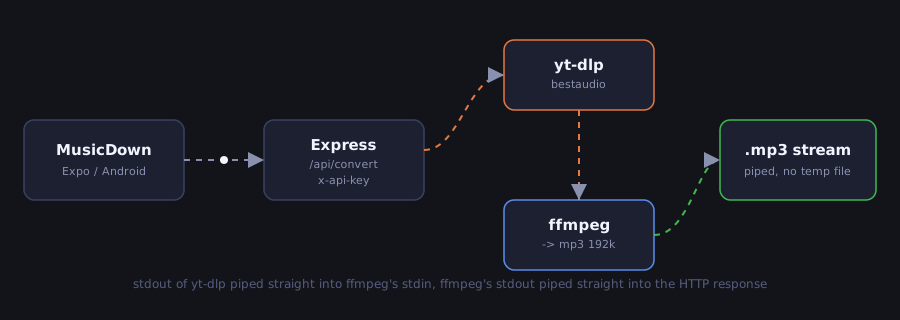
// server.js (simplified)
const ytdlp = spawn(YTDLP_PATH, ['-f', 'bestaudio/best', '--no-playlist', '--newline', '-o', '-', url]);
const ffmpeg = spawn(FFMPEG_PATH, ['-i', 'pipe:0', '-vn', '-f', 'mp3', '-b:a', '192k', 'pipe:1']);

ytdlp.stdout.pipe(ffmpeg.stdin);
ffmpeg.stdout.pipe(res); // straight into the HTTP response, no temp files on disk
Nothing ever touches the server’s disk — yt-dlp’s stdout goes straight into ffmpeg’s stdin,
and ffmpeg’s stdout goes straight into the HTTP response. The one wrinkle: since the response
body is the binary MP3, it can’t also carry JSON progress updates. So I regex-match yt-dlp’s
stderr for [download] NN.N%, stash it in an in-memory map keyed by a jobId the app generates,
and let the app poll a separate endpoint while the progress bar fills up.
| Endpoint | What it does |
|---|---|
GET /api/health | used by the app’s “Probar conexión” button |
GET /api/metadata?url= | runs yt-dlp -j, returns title/artist/thumbnail/duration |
GET /api/progress?jobId= | polled during a conversion for the progress bar |
GET /api/convert?url=&filename=&jobId= | streams back audio/mpeg |
Auth is a single x-api-key header, only enforced if I actually set an API_KEY env var (the
server nags with a warning at boot if I forget). There’s a Dockerfile that pulls the latest
yt-dlp binary straight off GitHub releases, but honestly I’m just running it on my own machine
on the home network for now — the README I wrote for it is upfront that this is for personal use,
not something to expose publicly, since re-hosting YouTube audio like this sits in a legal gray
area and there’s zero rate limiting.
Four tabs, one shared Button component
On the app side I used Expo SDK 54, expo-router for file-based navigation, and Nativewind
(Tailwind v4, but for React Native) for styling instead of pulling in a full UI kit. I wrote one
Button component with filled/outlined/text variants and reused it everywhere — partly
discipline, partly not wanting to spend the weekend picking a design system.
These are real screenshots off my phone, and it shows — this is a first working version. The plumbing all works end to end, but I haven’t touched the visual polish at all yet: default system fonts, no icons beyond the tab bar emoji, plain white backgrounds. That part’s next; for now I just wanted to get the whole loop working.
Descargar
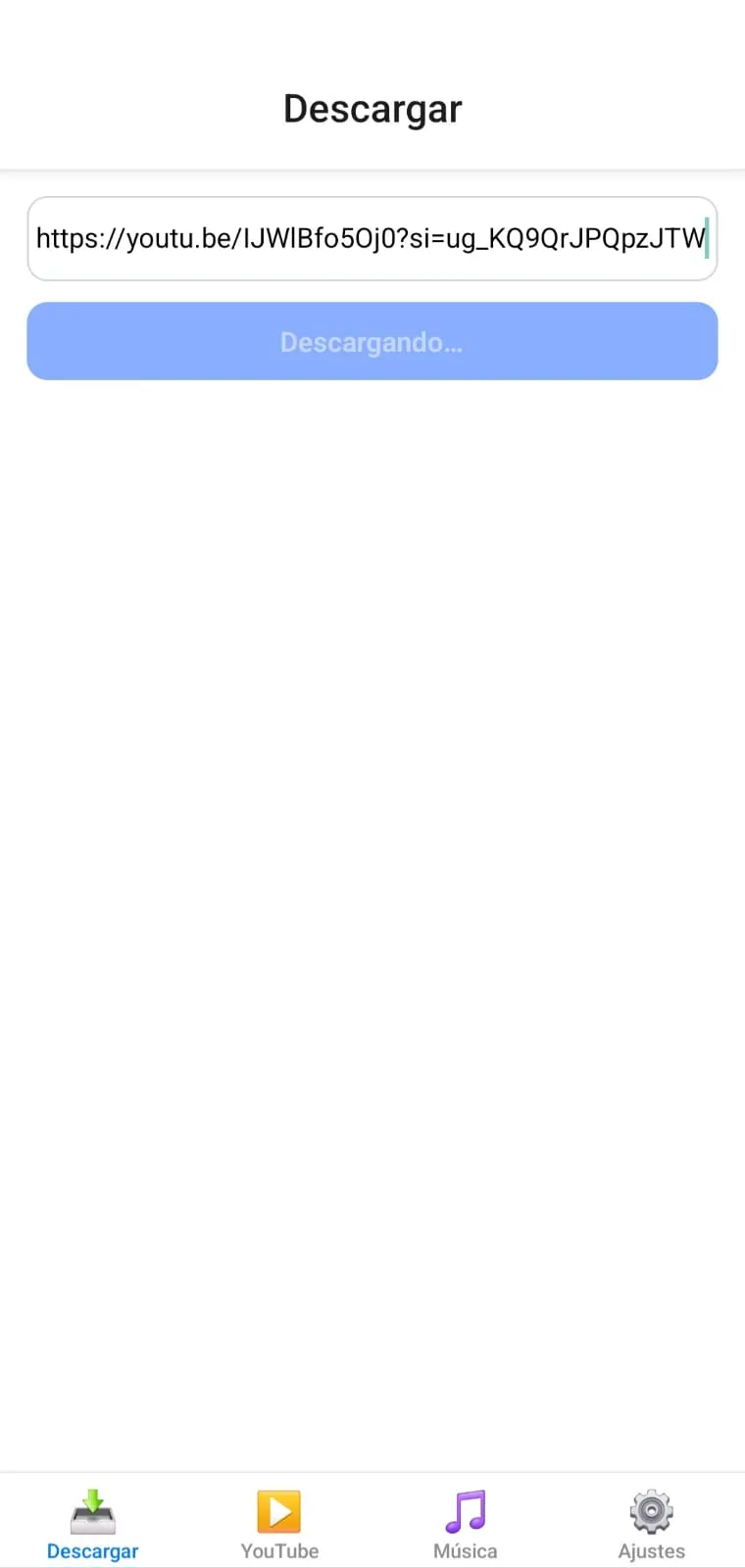
The front door. Paste a link, tap the button, and it walks through fetching the metadata,
streaming the conversion, and writing the tagged MP3 to Music/ — the button’s own label doubles
as the only progress indicator right now (Descargando…).
YouTube
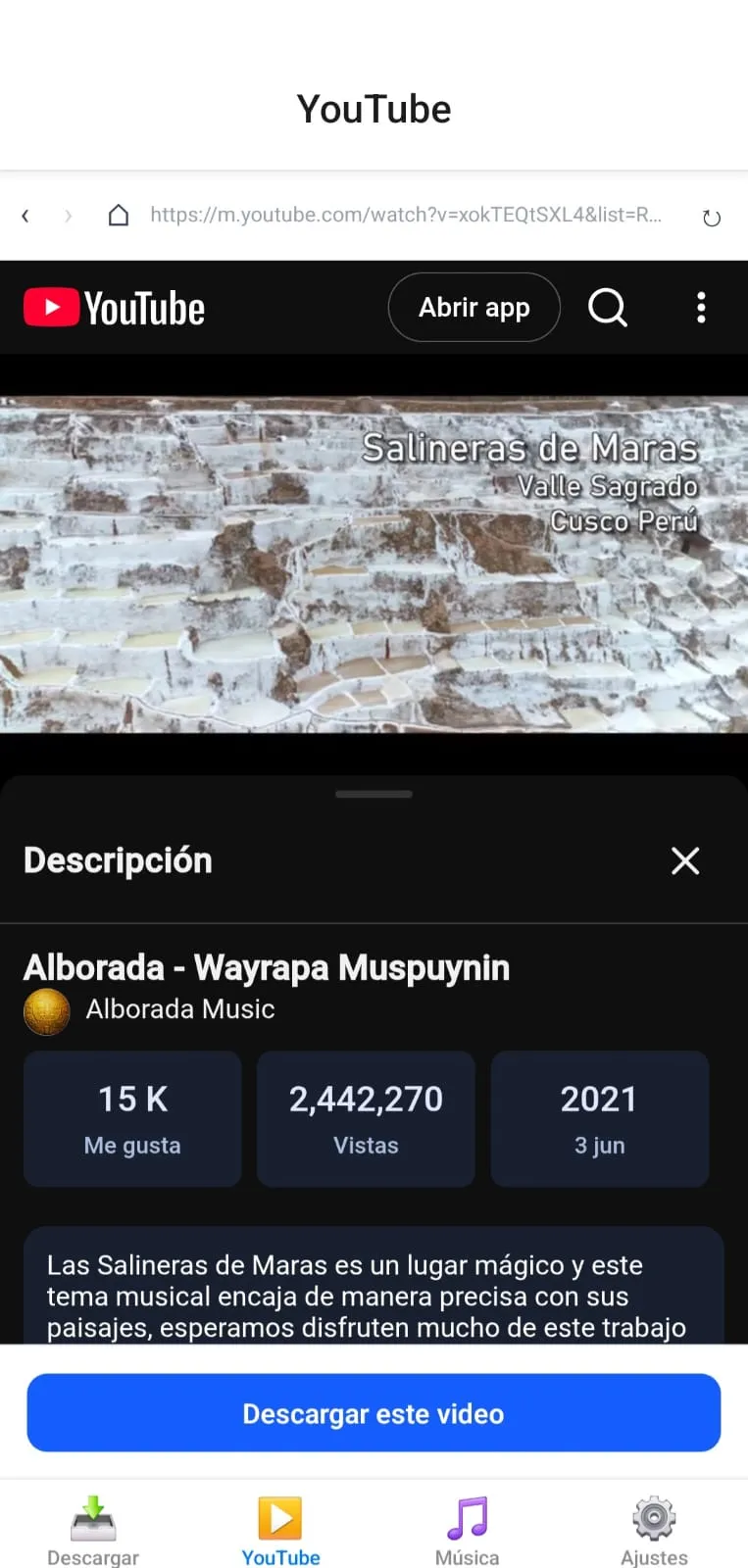
An in-app browser (react-native-webview) pointed at m.youtube.com, with an injected ad-block
script I’m a little proud of — it hides banner elements, auto-clicks “skip ad” buttons, and for
the unskippable ones just force-seeks the video to its own duration. The Descargar este video
button at the bottom only lights up once the current page is actually a video URL, and reuses the
exact same download flow as the Descargar tab.
Música
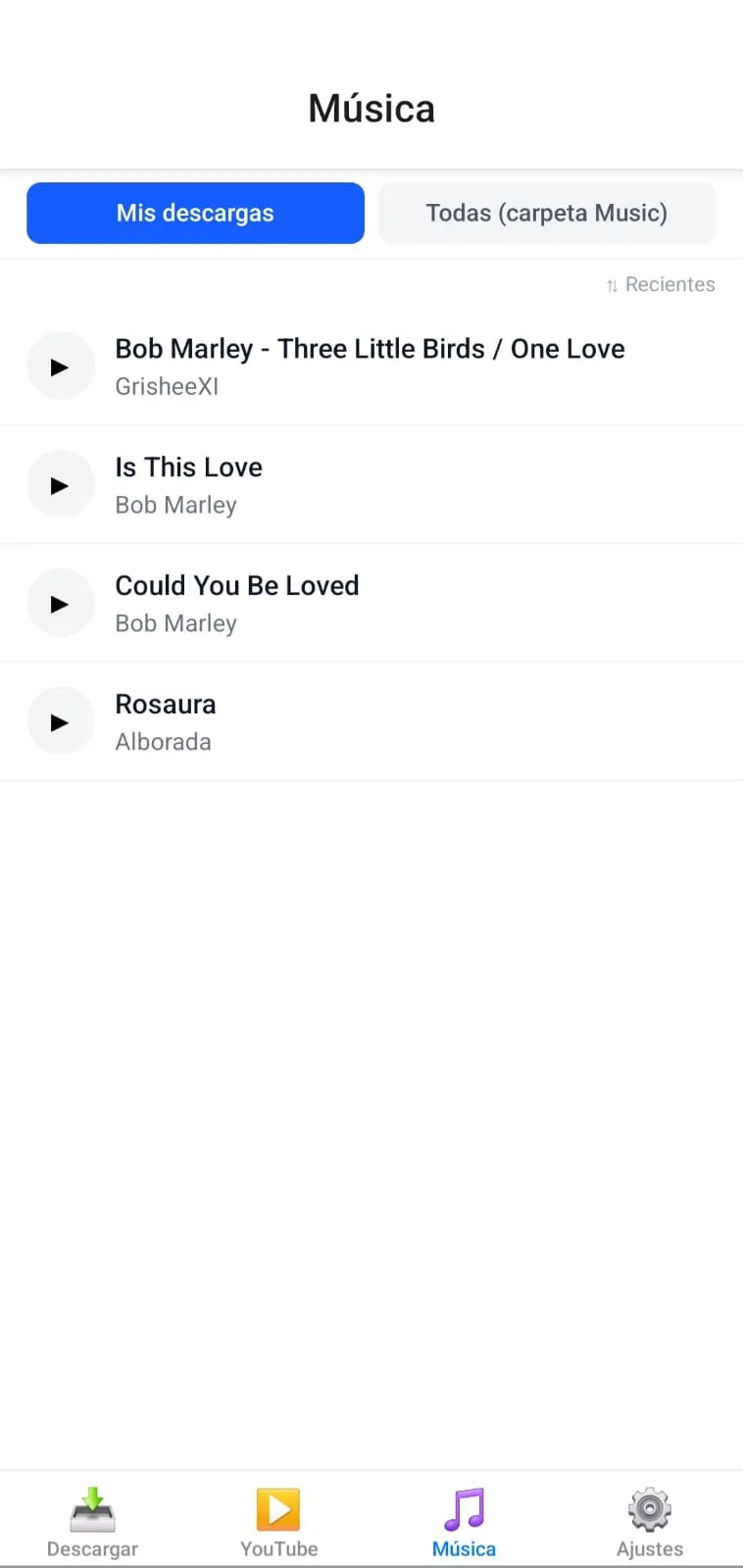
The library, with a toggle between Mis descargas (tracks downloaded through the app) and Todas (carpeta Music) (everything already sitting in the phone’s Music folder, which needs a real device build to read). Tapping a track you downloaded opens an edit screen — no screenshot of that one yet — where you can rewrite the ID3 title/artist/album and swap the cover art, either from your gallery or by searching the iTunes Search API right there in the app.
Ajustes
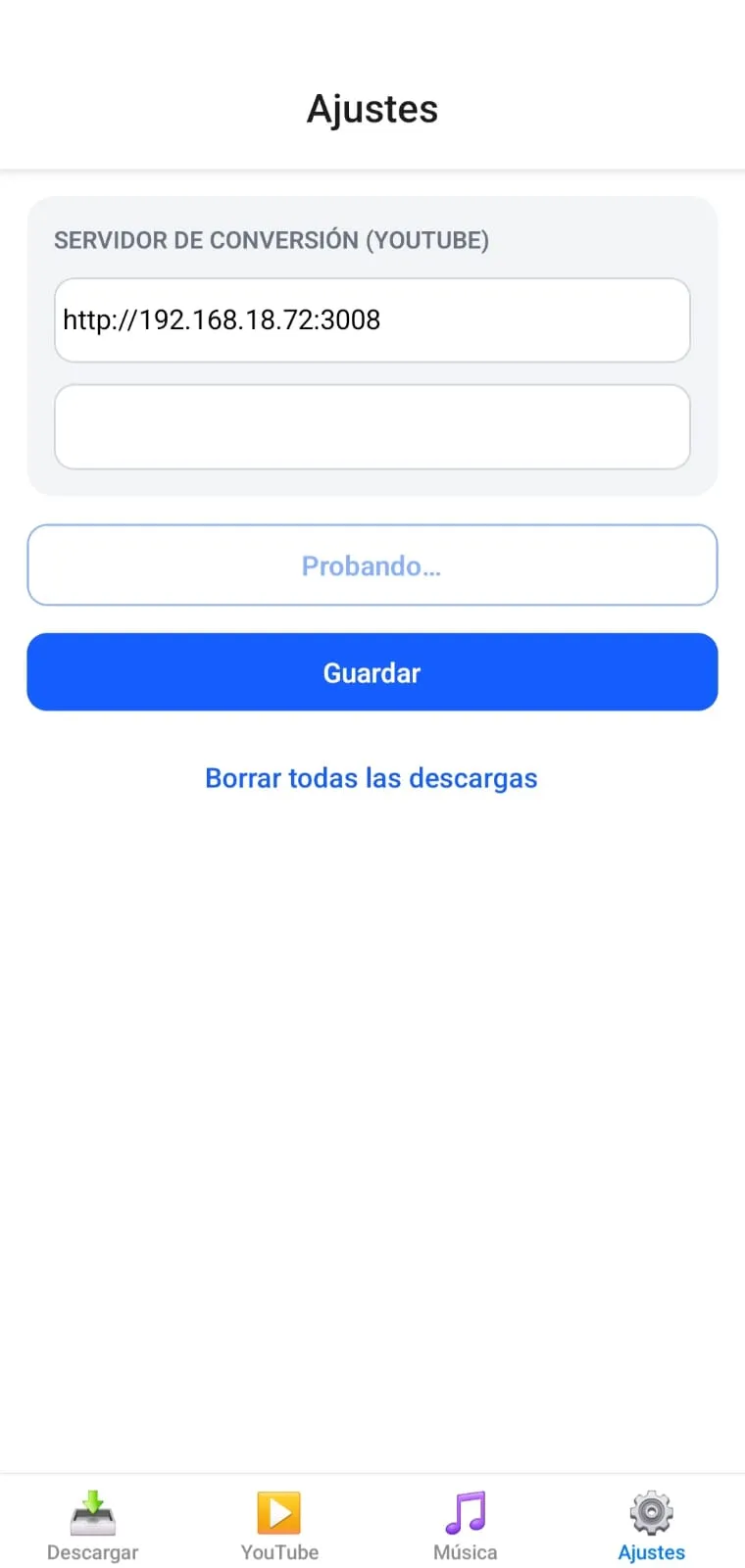
Just the server URL, the API key, a connection test button (mid-test in that screenshot — mine’s pointed at my own machine’s LAN IP), and — because I will absolutely need this one day — a “delete everything” button with a confirmation dialog.
The part that actually ate my Saturday
Everything above came together faster than I expected. What didn’t was Android’s storage permission model, which has changed enough across 11, 13, and 14 that half the blog posts I found while debugging were already out of date.
The Android 14 permission wall
The one that cost me the most time: on Android 14, every write and delete to my own downloaded
files was silently failing, with no error I could find anywhere. It took a long afternoon with
the expo-media-library source open in one tab and the Android permission docs in another to
figure out why.
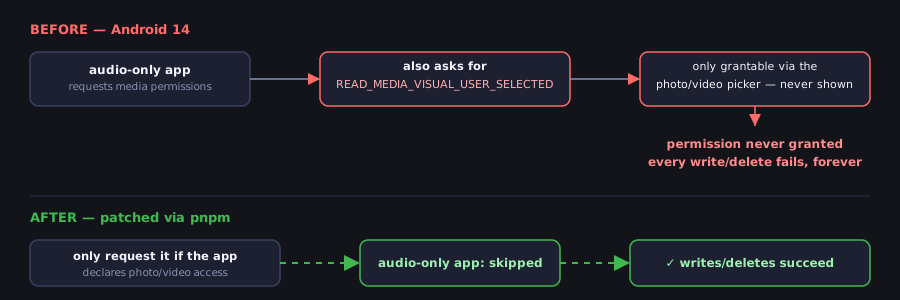
The library’s permission logic was unconditionally requesting READ_MEDIA_VISUAL_USER_SELECTED —
a permission that can only ever be granted through the photo/video partial-access picker. An
audio-only app never shows that picker, so the permission can never be granted, and every write or
delete call just fails, forever, on Android 14+. I ended up patching the library’s own Kotlin
permission code (applied automatically via pnpm’s patchedDependencies, so I don’t have to
remember to reapply it) so it only asks for that permission when the app actually declares
photo/video access — which mine never does.
A few smaller ones came out of the same rabbit hole.
No album folders
createAlbumAsync does raw filesystem I/O that needs a WRITE_EXTERNAL_STORAGE grant Android
13+ won’t hand out anymore. createAssetAsync alone uses the modern MediaStore insert path and
drops the file straight into Music/ without touching that wall, so I just stopped trying to
group things into albums.
Write-only, on purpose
The app only ever creates new assets, never reads the existing library through this permission, so it requests write-only access explicitly — which also sidesteps the granular “audio” read permission that Expo Go doesn’t even declare in its manifest.
Deleting needs the newer API
The legacy deleteAssetsAsync() doesn’t implement Android 11’s required user-consent flow — it
can silently no-op instead of deleting anything. expo-media-library/next’s Asset.delete()
properly triggers the real system confirmation dialog.
Why I need a real dev build, not Expo Go
Reading the whole Music folder needs READ_MEDIA_AUDIO, which Expo Go’s fixed manifest can’t
carry — only a custom development client, built with EAS, actually ships the native permissions my
config plugins add. That’s why both my dev and preview EAS profiles build a plain APK for
sideloading, rather than the Play-Store AAB format.
A broken enum
browser-id3-writer declares its ImageType as a TypeScript const enum, which gets erased at
compile time — but the published package ships plain JS with no runtime export for it, so
ImageType.CoverFront is quietly undefined. I just hardcoded the raw APIC picture-type byte
(0x03) instead, wrapped in a try/catch so one bad YouTube thumbnail can’t take down an entire
download.
Where it’s at
No background downloads or notifications yet — everything runs while the Download or YouTube tab is actually open, which is the obvious next thing to build. But as of this weekend I’ve got a working pipeline from “paste a link” to “tagged MP3, real cover art, sitting in my Music app,” and a much sharper mental model of exactly where Android’s permission system decides to bite you.