
On this page
- What changed
- The redesign
- Spotify likes, without the Spotify API
- One player, two engines
- Keeping the WebView playing with the screen off
- A silent WAV for the lock screen
- Buttons that lie
- Lyrics
- Playlists that survive a reinstall
- Doing less when nobody’s looking
- Home-screen widgets
- Smaller changes
- Where it’s at
The first MusicDown post ended with two pending items: visual polish, and anything that worked in the background. Both got done, but they turned out to be the smaller part of the work. Once I used the app daily, most of what needed fixing was about playback: keeping a song going with the screen off, controlling it from the lock screen, and getting a notification button to do what its icon says.
Same disclaimer as before: a hobby project for my own private use. Not a product or a service, and not an invitation to ignore anyone’s copyright or terms of service.
What changed
| July | November | |
|---|---|---|
| Tabs | Descargar · YouTube · Música · Ajustes | Música · Spotify · Descargar · Ajustes |
| Look | System fonts, emoji icons, white | Fraunces + Inter, Feather icons, one accent color |
| Player | Per-screen controls | One global player: mini bar, full screen, lyrics, queue, shuffle, repeat |
| Spotify | — | Liked songs synced both ways with my laptop, playable without downloading |
| Library | Downloads only | Playlists and “Me Gustan”, backed up to the server |
| Lock screen | — | Media notification with previous / play / next |
| Home screen | — | Nine widget variants |
| Extras | — | Cover-tinted player, battery saver, offline mode, private downloads |
The redesign
This time I designed the screens before writing any code: one HTML file with every screen side by side, then ported to React Native. The screenshots in this post come from that file; the app matches it almost exactly.
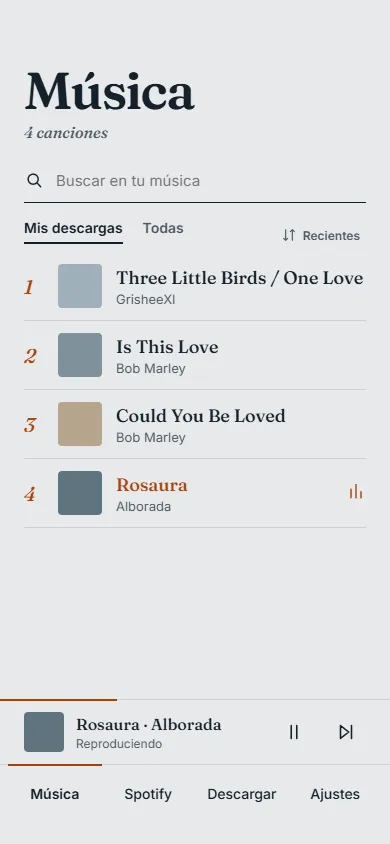
The whole visual system fits in theme.ts:
// Blue-tinted paper, dark ink, and a single terracotta accent.
export const colors = {
  bg: '#E6E9EA',
  ink: '#14212B',
  muted: '#4A5963',
  line: '#CBD0D3',
  accent: '#A8420E',
};
Fraunces for titles, song names and track numbers; Inter for the rest of the UI. The accent color has a single meaning, currently playing, and nothing else uses it. Songs without cover art get a flat color from a five-tone palette, picked by hashing the song’s id, so the same song always looks the same.
“Descargar” and “YouTube” did the same job, so they’re now one tab with an Enlace / YouTube switch, a list of downloads with progress bars, and a toast when a file is saved.
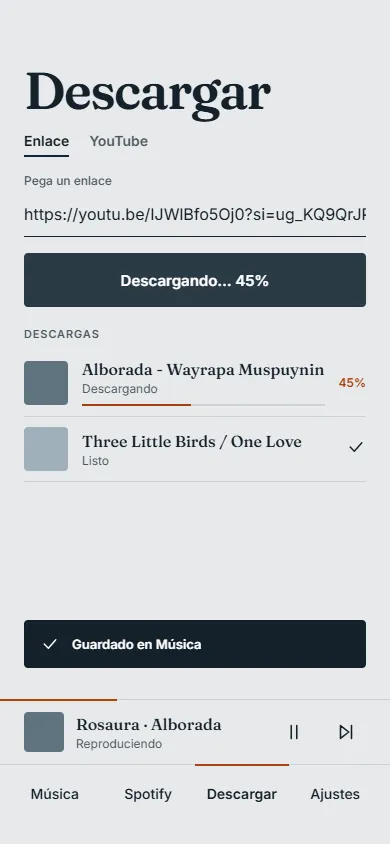
Spotify likes, without the Spotify API
I wanted my Spotify liked songs in MusicDown. The Web API isn’t a good fit for a personal app, because the developer who owns the app needs Premium to use it.
The desktop client already has my likes, though, and Spicetify lets me run JavaScript inside it:
- A Spicetify extension reads the liked songs using the desktop client’s own session. No client ID, no OAuth, no Premium.
- It
POSTs the list to my MusicDown server (/api/spotify-likes). - The phone
GETs it from there.
Spicetify exposes Spotify’s internal APIs, which change between client versions. So the
extension tries three strategies in order (internal GraphQL, the LibraryAPI object, and the Web
API through the client’s session) and keeps the first one that works:
for (const [name, strategy] of [['graphql', viaGraphQL], ['libraryapi', viaLibraryAPI], ['webapi', viaWebAPI]]) {
  try {
    return await strategy();
  } catch (e) {
    errors.push(`${name}: ${e.message}`); // try the next one
  }
}
It also listens for library update events, so a new like is synced three seconds later
(debounced), and it runs a silent sync whenever Spotify opens.
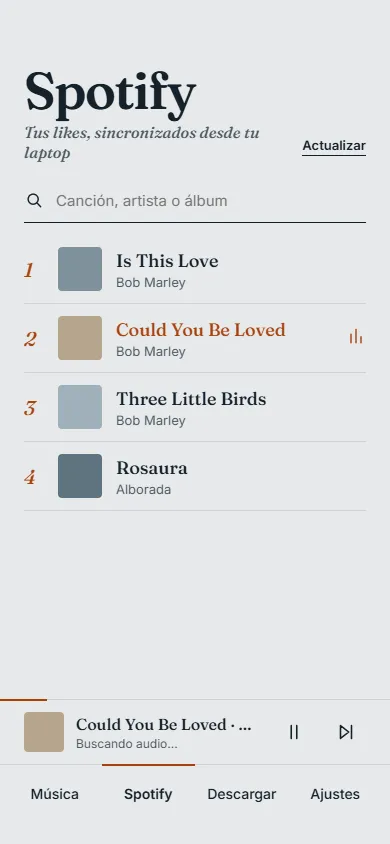
The sync now works in the other direction too. Deleting a liked song in the app calls
DELETE /api/spotify-likes/:id, and the server adds the id to a list of pending removals. While
Spotify is open, the extension checks that list every minute (and before each sync), removes
those songs from my real Spotify library, and confirms to the server. Until that confirmation
arrives, the server filters the removed ids out of incoming syncs, so a deleted song doesn’t come
back. Removing likes from Spotify can be turned off in the extension’s settings.
On the phone the list is cached for offline use. The first version stored it in AsyncStorage, which on Android fails to read values larger than about 2 MB, so large libraries stopped loading. The cache is now a JSON file in the app’s document directory.
One player, two engines
A liked song is just a title and an artist, so the app has to find the audio. I also wanted it to
behave like a downloaded song: same mini player, same queue, same lock-screen controls. A single
BackgroundPlayerProvider picks an engine per track:
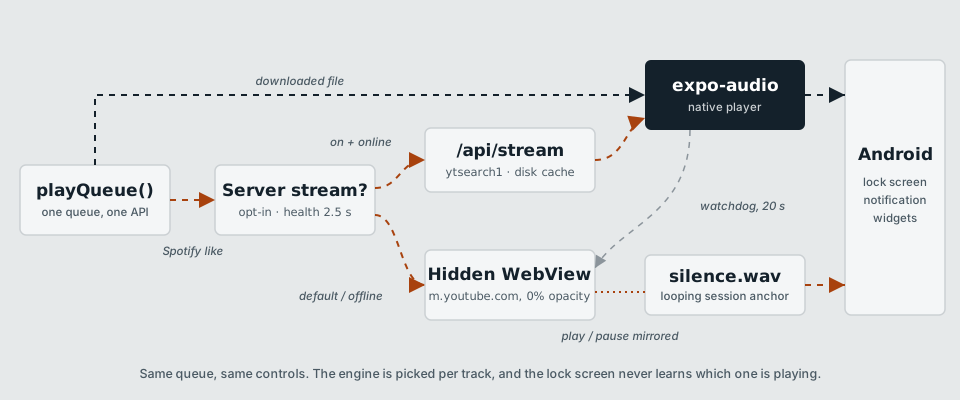
Downloaded files play through expo-audio.
Spotify likes play by default through a hidden WebView. It opens
m.youtube.com/results?search_query=…, an injected script picks the first real result (skipping
promoted videos and Shorts), and the app controls the <video> element through two globals,
__mdSetDesired('play' | 'pause') and __mdSeek(seconds). Once per second the script reports
position, duration and whether an ad is playing, which is how the mini player can show Anuncio.
My first attempt hid the WebView with width: 0 and display: none, and Chromium wouldn’t play
anything. It now stays mounted at 360×640 with opacity: 0.
Server streaming is an option in Ajustes. When it’s on and the server answers a health check
within 2.5 s, the app calls /api/stream?q=artist title. The server runs
yt-dlp "ytsearch1:artist title", saves the audio to a disk cache keyed by a hash of the query
(60 files max, oldest evicted first), and serves it with res.sendFile, which handles range
requests. Concurrent requests for the same song share one download.
Before passing that URL to the native player, the app sends its own Range: bytes=0-0 request
with a 70 s timeout. That makes the server finish downloading first, so the player gets an
immediate response instead of hitting its own, shorter timeout. If expo-audio still hasn’t
loaded after 20 s, the track falls back to the WebView.
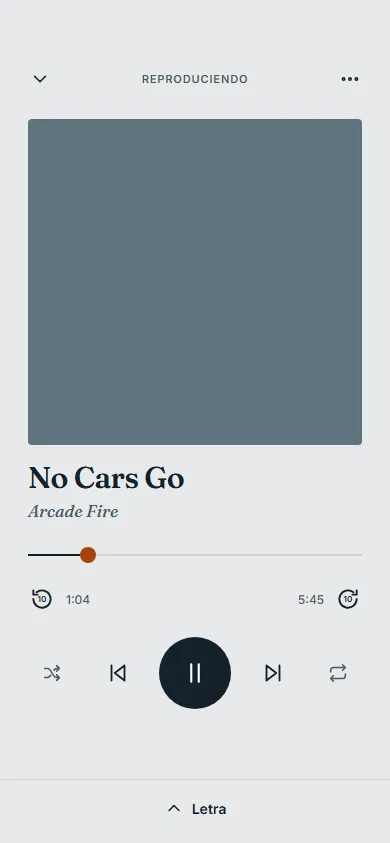
The full-screen player can also tint its background with the cover’s color (Ajustes → Temas).
coverColor.ts decodes the image in JavaScript (jpeg-js or upng-js), takes about 4,000
samples and picks the most saturated hue, ignoring whites, blacks and greys. Averaging the pixels
usually gives a muddy brown. The hue is then turned into a light pastel, whatever the cover looks
like, so the dark text stays readable. Colors for the next tracks in the queue are computed
ahead of time, so the background can fade to the new color as soon as the song changes.
Keeping the WebView playing with the screen off
Locking the phone stopped the WebView audio, for two separate reasons.
YouTube’s JavaScript pauses playback when the Page Visibility API reports the page as hidden. An injected script that runs before the page loads overrides that:
Object.defineProperty(document, 'hidden', { get: () => false });
Object.defineProperty(document, 'visibilityState', { get: () => 'visible' });
window.addEventListener('visibilitychange', (e) => e.stopImmediatePropagation(), true);
The capture-phase listener on window runs before YouTube’s listeners and stops the event. As a
fallback, if the video still pauses within three seconds of the page being hidden, the script
resumes it. After that it leaves playback alone, so it doesn’t interfere with calls or other
audio apps.
Android also notifies the WebView when its window is no longer visible, and Chromium then
pauses any video with a picture. JavaScript can’t reach that, so I patched
react-native-webview (applied through pnpm’s patchedDependencies):
@Override
protected void onWindowVisibilityChanged(int visibility) {
    super.onWindowVisibilityChanged(View.VISIBLE); // always visible, as far as Chromium knows
}
A silent WAV for the lock screen
Android builds the lock-screen media card from a media session, and a WebView playing a
<video> doesn’t get one.
The workaround: a second expo-audio player loops assets/silence.wav while the WebView engine
is active. That player owns the media session, so the notification shows the right title, artist
and cover. The audio mode is set to mixWithOthers so the silent track doesn’t take audio focus
from the WebView. Both stay in sync: when one pauses, so does the other, and a pause from the lock
screen is forwarded to the WebView with __mdSetDesired('pause').
The same silent player now has a second job. With the screen off, Android suspends apps that don’t have a foreground service, which used to stall bulk downloads of liked songs. During a batch download, if nothing is playing, the silent track starts with a “Descargando…” media notification, and the app keeps running and keeps network access until the batch ends.
Buttons that lie
In this version, expo-audio lock-screen controls only offer seek backward and seek
forward. There’s no previous or next track button.
First, I patched expo-audio’s Kotlin service so those two buttons show “previous” and “next”
icons. The underlying commands are unchanged: “next” still seeks forward ten seconds.
Then the app checks its own position on each status update and compares how far the song moved with how much time passed. During normal playback those match. A jump of 6 to 20 seconds that the app didn’t trigger itself must have come from one of those buttons:
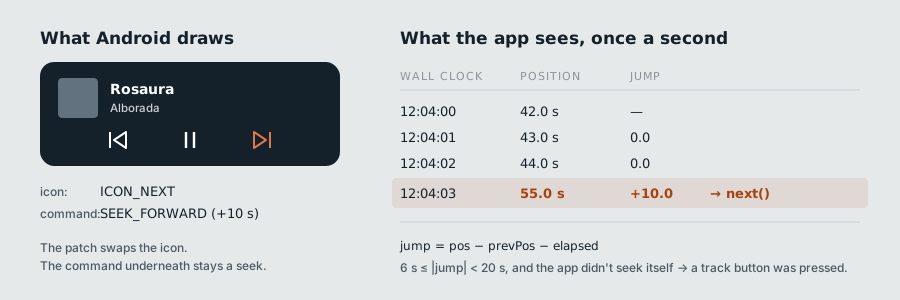
const elapsed = playing ? (now - prev.t) / 1000 : 0;
const jump = pos - prev.pos - elapsed;
if (Math.abs(jump) >= 6 && Math.abs(jump) < 20) {
  ignoreJumpUntil.current = now + 1500;
  jump > 0 ? next() : previous();
}
Every seek the app makes on purpose (the scrubber, the ±10 s buttons, loading a track) sets
ignoreJumpUntil first, so only external presses are translated. Since “previous” restarts the
song when it’s past five seconds, the ten seconds it already rewound don’t matter. With the
WebView engine, the jump is detected on the silent track, because that’s the one the lock screen
controls.
Lyrics
Lyrics come from LRCLIB, a free API with no key. YouTube titles are noisy,
so the query strips things like (Official Video) or feat., tries splitting “Artist - Song”,
and prefers results with timestamps and a duration close to the song’s.
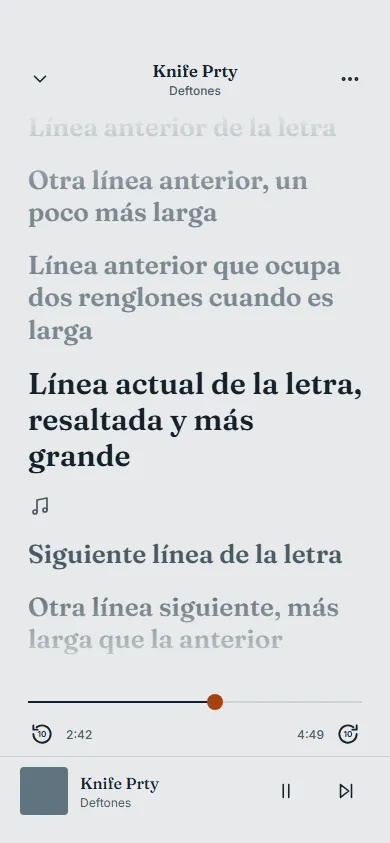
The lyrics view uses three levels: past lines faded, the current line large and dark, upcoming lines in mid grey. It follows the song until you scroll; then a “Línea actual” button appears, and following resumes on its own six seconds after you stop touching the screen. Tapping a line shows a button with its timestamp (▶ 2:55) that jumps there. Lyrics without timestamps get an approximate time based on the line’s position in the song.
Two caching rules: a cancelled request is never stored, and neither is a request where every call failed, which means no network rather than no lyrics. In both cases the song gets another chance next time.
Playlists that survive a reinstall
The Música tab now has a third view, Listas, next to “Mis descargas” and “Todas”. There’s an automatic “Me Gustan” playlist: double-tapping the cover in the player adds or removes the song (with an undo toast), and a rust heart next to the title shows when it’s in the list.
A playlist entry doesn’t depend on the song’s file. It’s keyed by the Spotify id, the download id or the external file id, and stores the title, artist and cover. If a file disappears, for example after reinstalling, the song stays in the list. If it’s a Spotify like, it can be streamed or downloaded again; if there’s no way to play it, it’s skipped.
Every change is backed up to the server (PUT /api/library-backup, 3 s debounce, only while the
server is reachable). On a fresh install with no local playlists, the app restores the server
backup. Until that restore has been attempted, nothing is uploaded. Otherwise a new install would
overwrite a good backup with an empty list on its first sync.
Doing less when nobody’s looking
Music often plays for hours with the screen off, so the player avoids work nobody will see:
- Native player events are handled outside React: end of track and lock-screen buttons work with the screen on or off, but React state only updates while the app is in the foreground, and at most once per interval except for important changes (play/pause, load, end).
- Player events arrive once per second instead of the default 500 ms.
- Battery saver (on by default) updates the progress bar every 2 s and freezes animations such as the equalizer icon and loading dots.
- Offline mode turns off everything that uses the network: server pings, syncs, downloads, lyrics lookups, cover searches and YouTube. Only what’s on the phone plays.
Home-screen widgets
MusicDown has nine widget variants built with react-native-android-widget: a 4×1 row and a 4×2
medium layout (each solid, semi-translucent or transparent), 4×2 and 4×4 cover layouts, and a
2×2 square, with Fraunces bundled for the titles.
Widgets run in a separate headless task, so the player publishes the current track to a small
bridge module that re-renders them and saves the state. After a cold start, the widget shows the
last song instead of an empty state. Cover art needed some care: a widget can’t read file://
URIs, and its data goes through Android’s Binder, which is limited to about 1 MB. The bridge
converts the cover to a base64 data URI, skips anything over 400 KB, and requests the 300 px
version of Spotify covers. It updates the widget immediately with the previous cover, then again
once the new one is ready.
Smaller changes
- Private downloads by default: files go to the app’s private storage with a
.zc3extension and aren’t added to the system media library. Sharing a song sends a temporaryArtist - Title.mp3copy. A setting in Ajustes restores the old behavior. - Offline likes: any liked song can be downloaded, individually or in bulk. The first YouTube result for a search is sometimes an hour-long mix, so the server asks for eight candidates and takes the first one between 45 seconds and 15 minutes long. A batch stops after three consecutive failures, which usually means the server is down.
- Files from the Music folder now show their real title, artist and cover. A small ID3v2 reader parses only the start of each file, where the tag lives, instead of the whole MP3.
- Server status: the app pings the server on launch and when returning to the foreground, and
disables features that depend on it. Local playback never does.
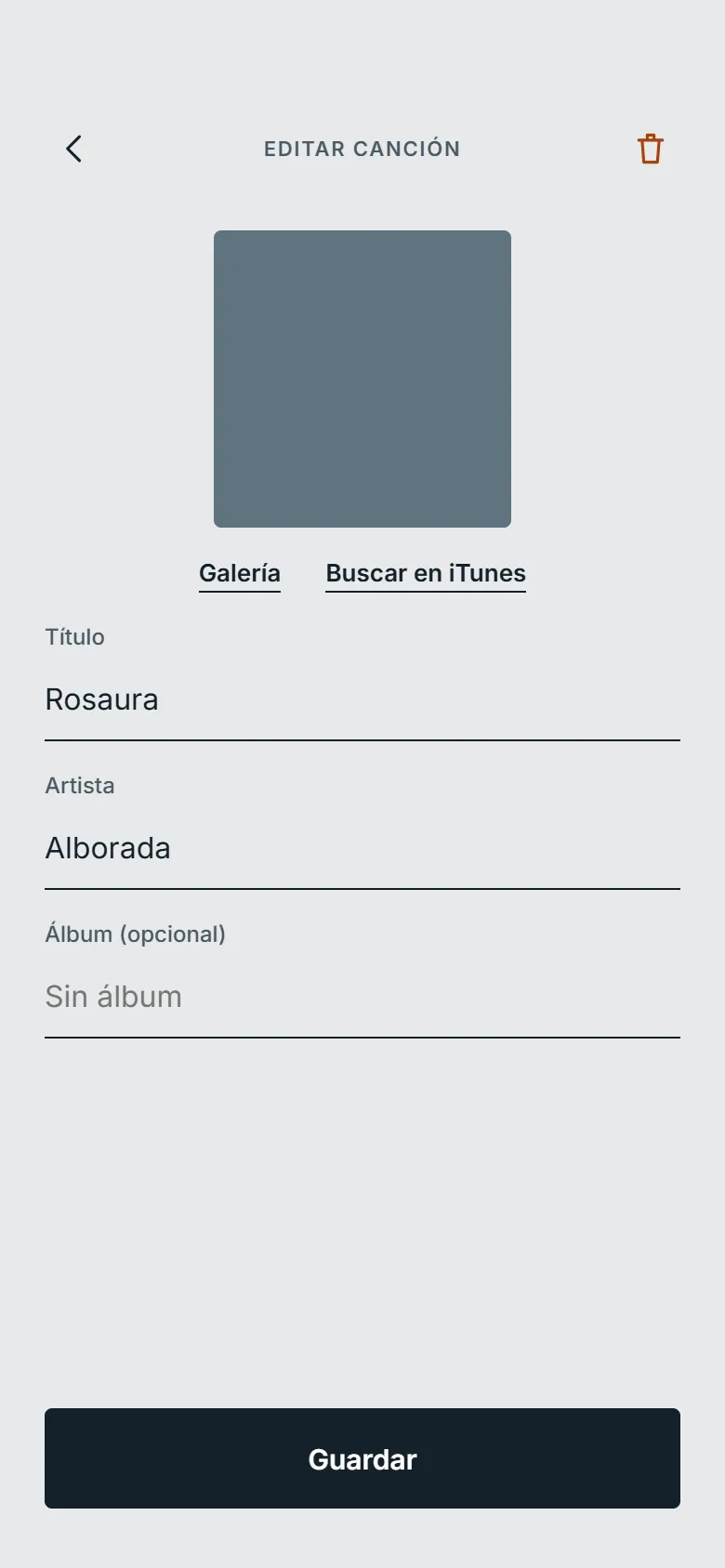
npm run start:tunnelruns the server behind a Cloudflare quick tunnel, so the phone also works away from my home network. - The edit screen (ID3 tags and cover, from the gallery or the iTunes Search API) already existed in July; it just finally looks good enough for a screenshot.
Where it’s at
In July, the hard part was Android’s storage permissions. This time it was media playback: media sessions, window visibility, and notification buttons. Most of the fixes in this post work by misleading one of those layers: a page that reports itself as visible, a silent file standing in for the music, a seek button acting as “next”.
One limitation remains. With the WebView engine, lock-screen and widget controls only take
effect once the app is back in the foreground, because React Native doesn’t deliver commands to
views while the app is paused. Server streaming doesn’t have that problem, since expo-audio
responds in the background, but it needs the server running. That’s the trade-off behind the
setting.
Comments